All games / OGame
Version 9.3.919 languagesFree to start Updated on October 9, 2026

OGame bot

Automatic expeditions, attacks, transports and fleetsave, with Telegram alerts

oBot for OGame is the Tampermonkey script that plays the repetitive parts for you: it sends expeditions as soon as slots free up, spies and attacks inactive players, moves resources between planets, saves your fleet before an attack and keeps the build queue running. It works on today’s OGame, on servers in every language, and alerts you on Telegram about every incoming attack.

User manual
oBot OGame — Automatic expeditions, attacks, transports and fleetsave, with Telegram alerts

Features

What the bot does

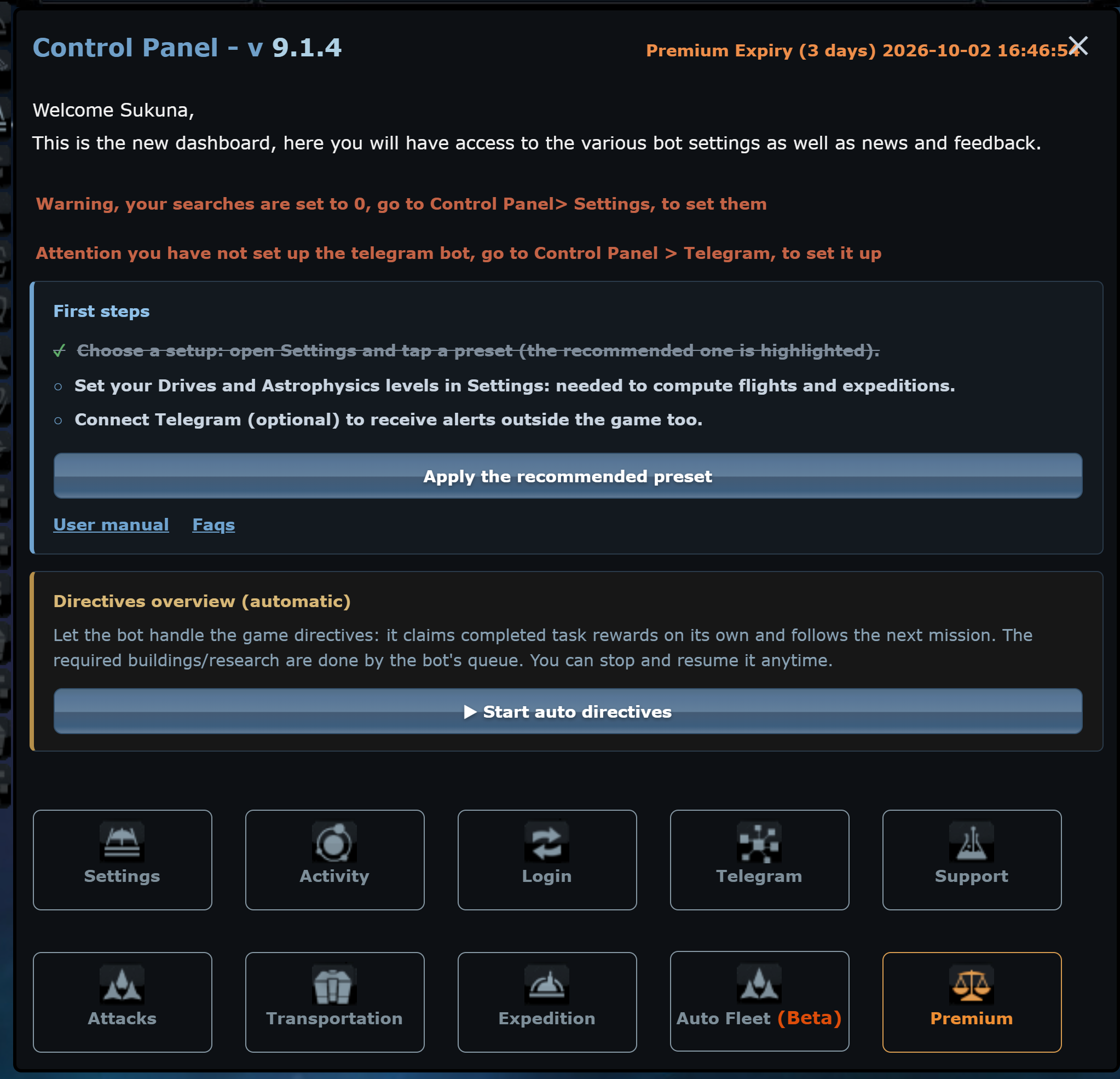
Every feature has its own tab in the oBot panel, with an explanation under every option and ready-made presets.

oBot OGame: Anomalies (Project Orion)
New

Anomalies (Project Orion)

On servers with Project Orion the bot produces lithium, scans and activates combat anomalies, sends the fleet there and collects the rewards. It alerts you on Telegram about new anomalies in the galaxy. Beta, with premium.

Read in the manual
oBot OGame: Expeditions

Expeditions

Automatic OGame expeditions with oBot: quick setup, fleet, continuous or fleetsave-based expeditions, advanced configuration and statistics.

Read in the manual
oBot OGame: Attacks

Attacks

Automatic OGame attacks with oBot: finding inactive players, espionage, loot thresholds, lists, automatic modes and probe attacks.

Read in the manual
oBot OGame: Transports

Transports

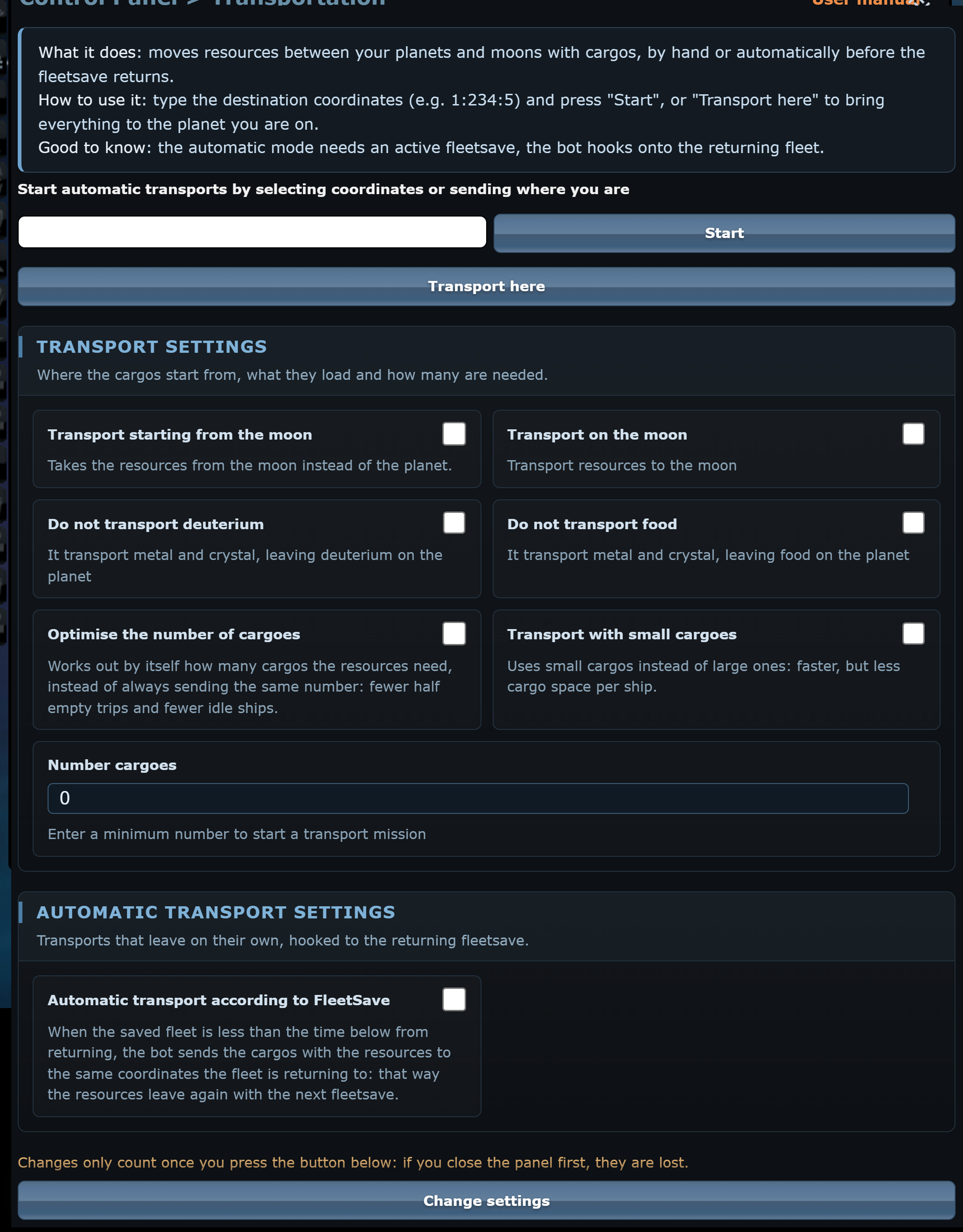
Automatic OGame transports with oBot: gathering resources on a planet or moon, cargo optimisation and transports when the fleetsave returns.

Read in the manual
oBot OGame: Autofleet

Autofleet

oBot Auto Fleet: automatic fleetsave of the fleet by deployment to the farthest planet or moon, at minimum speed.

Read in the manual
oBot OGame: Telegram

Telegram

Link oBot to Telegram: alerts for attacks, espionage and missiles, private messages, notifications of automatic missions and commands to the bot.

Read in the manual

Updated on October 9, 2026

What’s new

Every version with its date: the bot updates itself, here you see what changed.

v9.3.9
  • Fixed“Start message reading functionality” works again on OGame 13: the bot could not see the number of unread messages and could not read the tabs of the Messages page. Now it reads them without changing page (never during a mission) and recognises missile attack reports even when the interface is in a different language from the server
  • FixedPrivate message alerts: the bot no longer saw the OGame 13 chat counter
  • FixedExpeditions, “Recycle debris”: the bot never found the debris at position 16 (it read the galaxy in the OGame 12 format). Now it reads it like the Galaxy page, including the number of pathfinders needed
  • FixedAttacks, “Read all reports before attacking”: it stayed on the first page of messages (10 reports). Now it uses the OGame 13 paginator and goes through every page
  • FixedLogin, automatic logout at a set date: it could no longer find the OGame 13 Logout button and never logged out
  • FixedAutomatic anti-ballistic missiles: the bot orders the maximum that the silo and resources allow (before it always asked for 999)
  • ImprovedLogin settings: removed the “Close the lobby once you enter the universe” option, which has done nothing since 9.3.7 (the game opens in the same tab as the lobby)
  • Fixed“Supply the colonies”: source and destination are chosen together, resource by resource. Before, it always left from the planet richest in total, which therefore never received anything: the main planet could stay stuck for hours waiting for crystal that a colony had in abundance. The source never gives away what its own queue needs
  • Fixed“Supply the colonies” no longer starts when the page is about to change (a build just started, a page change coming, queue lanes at work); if a reload interrupts it before sending, it retries on the next page instead of in 10 minutes
v9.3.8
  • Fixed“Disable the bot” really stops the bot, in every tab and until you turn it back on: no automatic page changes, no supplies, no ship rebuilds and no anomaly rounds in the background. Before, it only applied to the open tab and cancelled itself after a day
  • ImprovedBuild queue with parallel lanes: on every pass over a planet the bot also starts the first item of research, buildings and lifeform research when OGame marks them as buildable, without changing page. Before, a blocked research at the top also stopped buildings with a free construction slot
  • FixedAnomalies: at the end of a round the bot goes back to the Overview. Before, it stayed on the Scanner page and the build queue did not restart
v9.3.7
  • NewNew “Anomalies” menu (Project Orion), only in universes that have the Anomaly Scanner: the bot produces lithium with a sustainable conversion, collects mission rewards (never with Dark Matter), finds and activates PvE battle anomalies and sends them a fleet strong enough for the waves. Each feature can be turned on separately
  • NewAnomalies seen in the galaxy: list with level, difficulty, PvP and minutes until they disappear, plus an optional Telegram alert for new ones
  • FixedAuto login: the game did not open from the lobby (the browser blocked the new window). Now it enters in the same tab
  • FixedBuild queue: one week of waiting counted as 52 days (a long research stopped the planet for almost two months) and waits over 25 days made the page change every few seconds
  • FixedThe planet buttons and “Refresh” under the menu show the remaining time again
  • NewBuild queue: new “Packages” button on the Resources page instead of the S/M/N/L letters. Each package has a name and an explanation (Planet start, Mines up to 25/22/20, Defences, Robotics and nanites, Research lab), asks for confirmation with the number of items and is added at the end of the queue instead of replacing it
  • NewShips and defences in the queue with a quantity: the bot orders them as soon as resources allow, without opening the page, even while a mission is running
  • NewNew option “Supply the colonies” (Commander): every 10 minutes, without changing page, the bot sends with cargo ships from the richest planet the resources the other colonies are missing for their next queued builds
  • NewNew option “Rebuild probes and cargo ships” (Attacks): every 30 minutes it reorders the lost probes and the cargo ships that were missing in the last attack, without changing page and without spending more than 30% of the planet's resources
  • NewNegative energy: if the next build is a mine, the Solar Plant goes first (every mine level lowered the energy even more)
  • NewAttacks menu: the result of the last round at the top, with how many targets were good and why the others were discarded (defended, active, low loot, report without data)
  • NewEspionage too low: if in an attack round 3 or more reports have no fleet and defence data, the Espionage research moves to the top of the research queue (at most every 6 hours)
  • NewFull storage: if metal, crystal or deuterium reach 95% of capacity, the right storage moves to the top of the queue (with full storage the mine produces nothing)
  • NewAttack and expedition statistics saved automatically, without having to open the message tabs by hand, including the deuterium spent on attacks
  • ImprovedQueue in lanes: buildings, research and lifeforms work in parallel, a mine no longer waits behind a research
  • ImprovedOne action at a time: while an expedition, attack or transport is running, the build queue no longer changes page or planet. It resumes when the mission is over
  • ImprovedCalmer pace: at least 6 seconds between one automatic page change and the next, the steps on the Fleet page are spaced out more, and an automatic attack round starts at most every 3 minutes (expeditions every 2)
  • ImprovedAttacks: with a fixed zone each round spies its window of “systems per round” and the next one continues from there, instead of spying the same systems again and again
  • ImprovedAttacks: they start from the planet that has the cargo ships and spy from the one that has the probes, instead of the nearest planet even when empty
  • FixedAttacks stopped for “not enough deuterium” with more than a million deuterium on the planet: the abbreviated number (1.2M) was read as 1,200
  • FixedAttacks: after a spy round with no good targets, no probes or no cargo ships the bot takes a break instead of starting again right away
  • FixedAttacks: probes are read once the galaxy has loaded (before they showed as zero) and inactive players are no longer discarded because of the activity left by whoever spies on them
  • FixedAttacks: up to 64 probes are sent to targets without data, and the number that gives a complete report is kept for the next time
  • ImprovedAttacks: a target that still shows no fleet and defences even with 64 probes (its Espionage is far higher) is not spied again for 3 days: no probes wasted every round
  • ImprovedAttacks: a target with fleet or defences in the report (which the bot never attacks) is not spied again for 2 days: its defences shot down the probes every round
  • FixedOld espionage reports deleted one at a time: no more “Your last request has not been processed yet”
  • FixedExpeditions: with free slots it retries after 10 minutes instead of an hour
  • FixedQueue with several planets: the bot goes first to the planet that has been waiting longest. Before it followed the list order and a colony could stay idle for hours with a free construction slot
  • FixedShips and Defences: the “max” button appeared several times and the quantity field could stop responding
  • FixedError on the Defences page with a defence that cannot be built; style refresh right after a bot update

How it works

Installation in three steps

Install Tampermonkey

The free extension for Chrome, Firefox, Edge and Opera that runs scripts on web pages.

Install your game’s bot

One click from the game page: the script updates itself with every new version.

Open the game and switch it on

The oBot button appears in the game: choose what to automate, save, and the bot works for you.

FAQ

Frequently asked questions

Is oBot free?
Yes. oBot is a free Tampermonkey userscript: activity, automatic login, build queue and interface conveniences cost nothing. Premium unlocks attacks, expeditions, transports, Auto Fleet and Telegram; every new account gets a 3-day trial.
I ticked an option but the bot ignores it. Why?
Options only apply after you press Change settings at the bottom of the menu. If you close the panel first, the change is lost. The Quick setup of Attacks and Expedition also fills in the form without saving.
How do I know whether the bot is running?
Hover over the first button of the quick action bar: it says whether the bot is on or paused. With auto-activity on, the tab title shows the countdown to the next refresh.
I set a farming zone and pressed "Find inactive targets". The bot spies, reads the reports, runs one round of attacks and then stops. Why?
That is correct: Find inactive targets runs a single round. For a continuous flow turn on one of the Automatic missions in the Attacks menu: continued or based on fleetsave.
I sent the token but the panel says the account is not connected.
Send the token without quotes and without spaces, wait for the bot reply on Telegram and the "Chat set up successfully" message on the OGame page, then reload the page.

All FAQ