User manual

Activity

oBot auto-activity: random refreshes to look like a player at the keyboard, activity tied to fleetsave, attacks and expeditions, sound alarms.

Last update: October 9, 2026

What it is for

Auto-activity is the heartbeat of the bot: it reloads pages at random intervals, checks incoming fleets and triggers the alarms. Automatic missions wake up at every refresh, so with auto-activity off the bot sits idle between one action and the next.
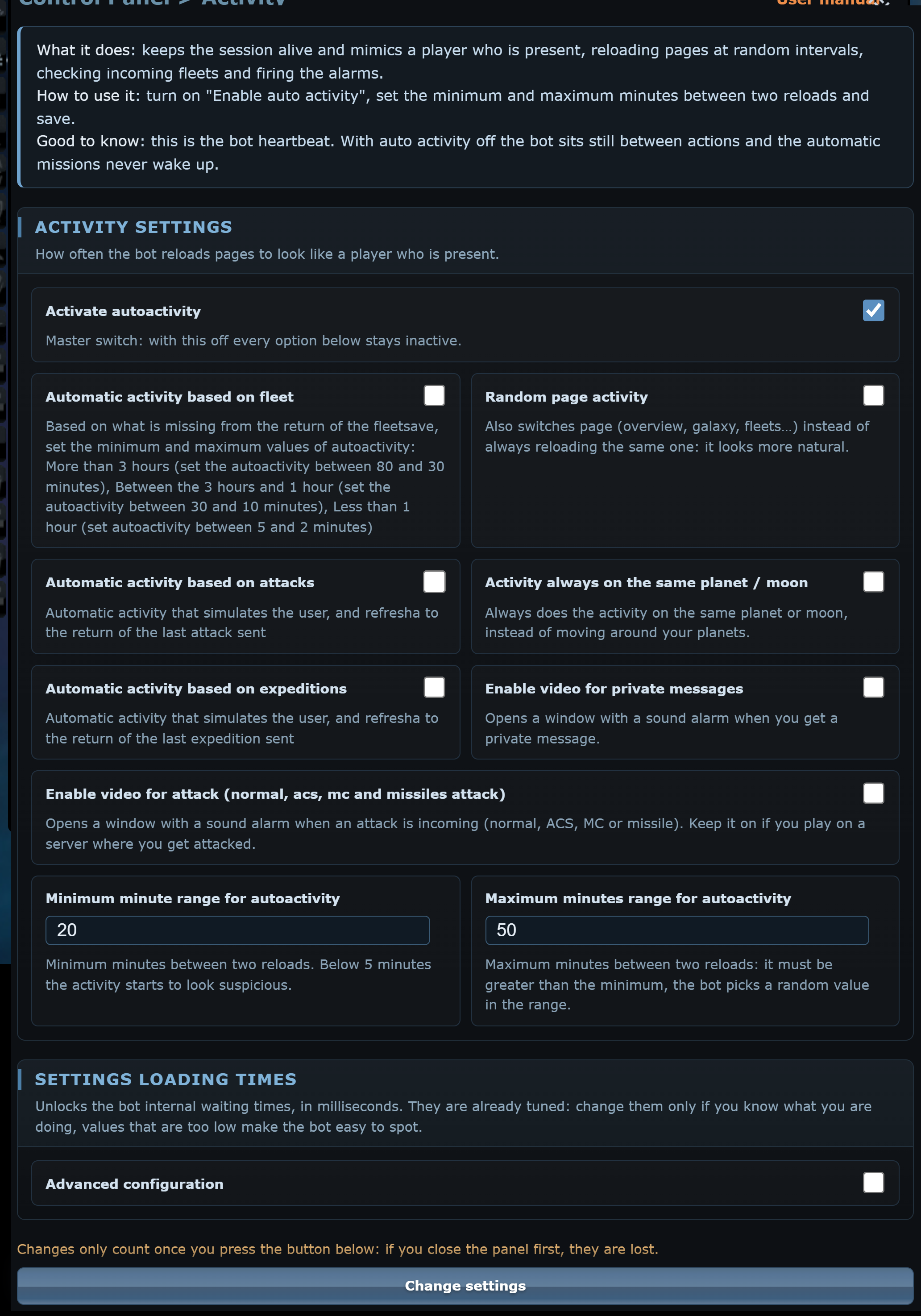
Activity menu

Setting it up

  1. Tick Activate autoactivity: the other options appear.
  2. Choose how the intervals are worked out: fixed (minimum and maximum in minutes) or automatic, based on fleetsave, attacks or expeditions.
  3. Set Minimum minute range for autoactivity and Maximum minutes range for autoactivity, for example 10 and 45: the bot picks a random value in between.
  4. Press Change settings.

From then on the tab title shows the countdown to the next refresh. While the bot panel is open the reload waits until you close it (10 minutes at most), so the settings you are changing are not lost.

Options

Automatic activity based on fleet
The intervals depend on how long until the fleetsave returns: over 3 hours between 30 and 80 minutes, between 1 and 3 hours between 10 and 30 minutes, under an hour between 2 and 5 minutes. With this option on, the manual minimum and maximum disappear.
Random page activity
Instead of always reloading the same page, the bot moves between overview, galaxy, fleet and others: it looks more natural.
Automatic activity based on attacks
Reloads when the last attack sent comes back, so the bot starts again as soon as the ships return.
Automatic activity based on expeditions
Reloads when the last expedition comes back. It is the right option with continuous automatic expeditions.
Activity always on the same planet / moon
Always performs the activity on the planet or moon you are on, instead of cycling through your planets.
Enable video for private messages
Opens a window with a sound alarm when you receive a private message.
Enable video for attack
Opens a window with a sound alarm when a normal, ACS, MC or missile attack is coming. Keep it on if you play where people attack you.

Good to know

The maximum must be larger than the minimum, otherwise saving is refused. Below 5 minutes the activity starts to look suspicious.

Advanced timings

The Settings loading times section, with Advanced configuration, unlocks the internal activity timings: for example how long an incoming espionage must last to be treated as a disguised attack (3 minutes) or when a slot counts as a fleetsave (1 hour). They are already tuned: change them only if you know what you are doing.

© oBotAll gamesOGameManualFAQPrivacy info@obot.it

Game names and images belong to their respective owners (OGame, Ikariam and Gladiatus: Gameforge 4D GmbH). oBot is an independent project, not affiliated with or endorsed by the game publishers.