 OGame
OGameWarning!
oBot is not responsible for any ban or problem arising from the use of the bot.
By using it, you take responsibility for any risk.
By using it, you take responsibility for any risk.
Requirements
Supported servers:
OGame version compatibility: 13.x
You need a computer with Google Chrome or Mozilla Firefox and the Tampermonkey extension. Mobile browsers are not supported.
Google Chrome
Mozilla Firefox
Installation
- Install Tampermonkey from your browser store with the links above.
- Chrome only: open chrome://extensions, turn on Developer mode at the top right and, in the Tampermonkey details, allow user scripts. Without this permission Chrome runs no userscript at all.
- Open the download link https://js.obot.it/obot.user.js. Tampermonkey recognises the script and shows its installation page.
- Press Install. From now on the script updates by itself.
- Reload the OGame tab, or enter your universe: the oBot entry appears in the left menu.

Manual installation
If the browser does not open the installation page, click the Tampermonkey icon, choose Create a new script, paste the whole text of https://js.obot.it/obot.user.js over the template and save with Ctrl+S.
Updates
- Tampermonkey checks for a new version by itself and updates the script. There is nothing to reinstall.
- As soon as the script updates, the bot checks right away which version is available and downloads it.
- Before running the downloaded code, the bot compares its SHA-256 fingerprint with the one published on the server: if they differ it does not start and tells you so.
- Each version's news appears in the News window of the panel, the first time you start it after the update.
OGame settings
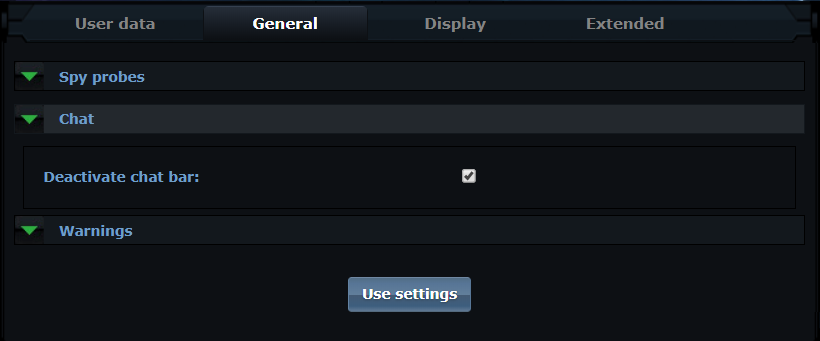
Two OGame settings make the bot more reliable:
- Disable the chat bar:
- Set 50 in Number of messages displayed per page, so the bot reads more reports at a time:

Other userscripts
oBot works alongside the most popular scripts. AntiGame is no longer needed: without it, oBot builds the espionage report table by itself. Errors that start inside other userscripts, such as OGLight, are not blamed on oBot.
Limitations
Warning!
- The script handles one universe at a time;
- the bot only works with the computer on, the browser open and the OGame tab active;
- the tab must not be minimised or left in the background, otherwise the browser slows it down and the bot stops.
Video (previous version)
The video was recorded on a previous version: some steps and the look of the panel have changed.